Know here Why Choose a MacBook Type-C Hub Over Traditional Adapters.
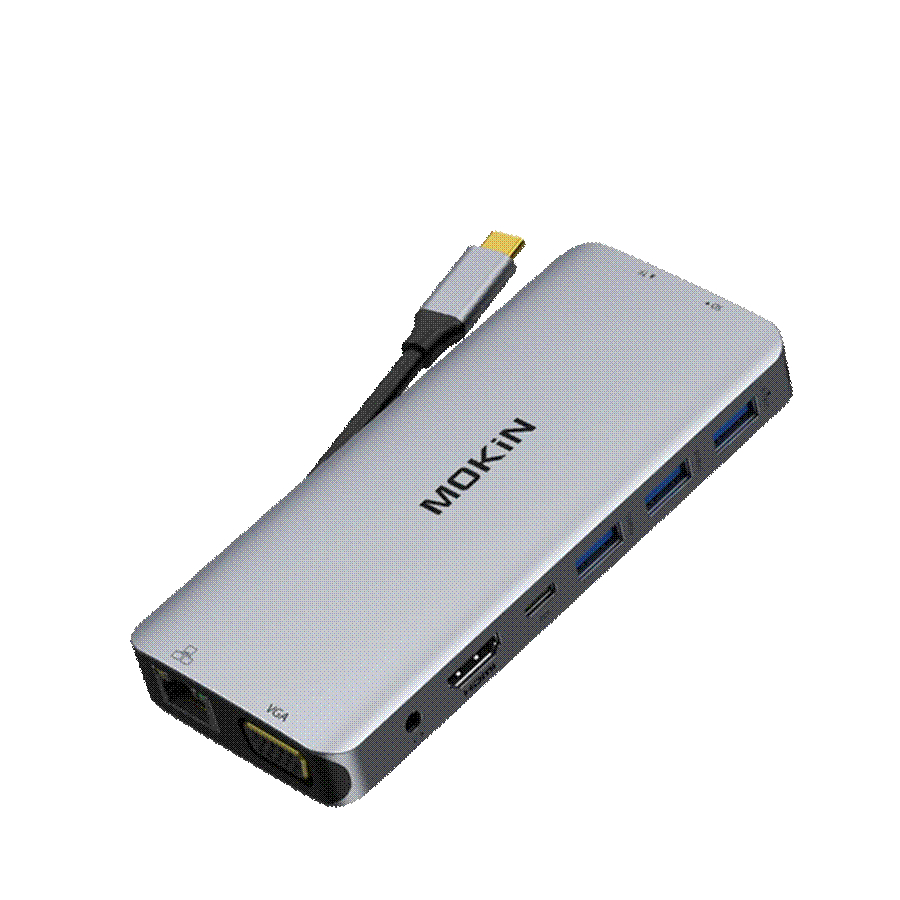
If you're a MacBook user, you've likely experienced the frustration of reaching for a port that simply isn't there. Need to connect an external monitor for a presentation? That requires one adapter. Plugging in a USB drive from a colleague? Another adapter. Reading an SD card from your camera? Yet another dongle joins the growing collection in your bag. This cascade of single-purpose accessories creates clutter, eats into your productivity, and turns simple tasks into multi-step ordeals.
The modern solution to this connectivity chaos is the MacBook Type-C hub—a single device that consolidates multiple ports into one elegant package. But why should today's tech-savvy professionals choose a hub over the traditional adapters they've relied on for years? The answer lies in efficiency, functionality, and the way we work now. In this article, we'll explore exactly why a unified USB-C hub surpasses the outdated adapter approach and how it transforms your MacBook into a truly versatile workstation.
Traditional adapters were designed for a world where laptops came equipped with a diverse array of ports. When Apple stripped the MacBook down to USB-C connections, these single-purpose dongles became a necessary evil—but they were never meant to serve as a long-term solution. Carrying a separate HDMI adapter, USB-A converter, SD card reader, and Ethernet connector means juggling multiple small devices that are easy to lose and tedious to manage. Cable tangles become inevitable when you're fishing through a bag full of adapters before every meeting or work session.
Beyond the physical inconvenience, traditional adapters introduce real productivity bottlenecks. Each adapter occupies one of your MacBook's limited USB-C ports, forcing you to constantly swap connections depending on the task at hand. Compatibility issues compound the problem—older adapters may not support the latest data transfer speeds or display resolutions, leaving you with degraded performance or outright connection failures. The constant plugging and unplugging also accelerates wear on your MacBook's ports. For professionals who depend on seamless workflows, this piecemeal approach creates friction at every turn, making it clear that a unified connectivity solution isn't just convenient—it's essential.
A MacBook Type-C hub is a compact peripheral device that plugs into a single USB-C port on your laptop and instantly expands it into a multi-port docking station. Think of it as a central connectivity nerve center—one connection point that branches out into the diverse array of ports modern professionals need daily. Rather than dedicating each precious USB-C slot to a single function, a hub multiplies your options through one streamlined interface.

Most quality hubs pack an impressive variety of connections into a palm-sized enclosure. You'll typically find HDMI ports for external displays, multiple USB-A ports for legacy peripherals like flash drives and keyboards, SD and microSD card slots for photographers and content creators, an Ethernet port for stable wired internet, and a USB-C pass-through port for charging your MacBook while the hub is in use. Some advanced models even include 3.5mm audio jacks and additional USB-C data ports. In modern workflows where professionals routinely switch between video calls, file transfers, presentations, and creative editing within a single workday, the hub serves as a permanent bridge between your minimalist MacBook and the full ecosystem of devices surrounding it. It transforms a two-port laptop into a workstation-class machine without sacrificing portability.
What separates a quality MacBook Type-C hub from a basic adapter isn't just the number of ports—it's the sophistication of how those connections work together. Modern hubs are engineered to handle simultaneous high-bandwidth tasks without bottlenecks, delivering professional-grade performance in a package that slips easily into a laptop sleeve. The best models combine display output, data transfer, and power delivery into a unified system where each function enhances rather than compromises the others.
Today's USB-C hubs support 4K resolution at 60Hz—and premium models push into 8K territory—delivering crystal-clear visuals for design work, video editing, and client presentations. Many hubs offer dual HDMI or a combination of HDMI and DisplayPort, enabling you to drive two or even three external monitors simultaneously. The signal remains stable and artifact-free because modern hubs use dedicated display controllers rather than relying solely on bandwidth sharing. For creative professionals color-grading footage or architects reviewing detailed blueprints, this high-fidelity output means the hub replaces what once required a dedicated desktop setup.
Modern USB-C hubs have shed the bulky plastic housings of earlier docking stations. Aluminum-clad designs weigh under 100 grams and measure barely larger than a pack of gum, yet house seven or more ports. This compact form factor eliminates the cable spaghetti that plagues multi-adapter setups—one short cable connects to your MacBook, and everything else plugs neatly into the hub. For professionals moving between co-working spaces, client offices, and home desks, this streamlined portability means a complete workstation fits in any pocket.

Gallium Nitride technology represents a leap forward in charging architecture. GaN chargers integrated into advanced USB-C hubs—such as those offered by MOKiN—deliver up to 100W of power through a pass-through port while running significantly cooler and smaller than traditional silicon-based chargers. This means your MacBook charges at full speed even while you're transferring files and outputting to an external display. The efficiency gains translate to less wasted energy as heat, extending both the hub's lifespan and your battery's long-term health—a critical advantage for professionals who need reliable portable charging throughout demanding workdays.
The modern professional's workflow rarely involves a single device or task. A graphic designer might simultaneously run a color-calibrated external monitor, transfer large files from a client's USB drive, and keep their MacBook charged—all while on a video call. A MacBook Type-C hub makes this possible without compromise. By offering simultaneous connections to multiple peripherals through one port, hubs eliminate the impossible choice between charging your laptop and connecting an essential device. You simply plug everything in at once and focus on the work itself.
For professionals who split their time between offices, coffee shops, and airport lounges, portable charging solutions become non-negotiable. Hubs with integrated GaN-powered pass-through charging solve a persistent pain point: maintaining full battery while actively using peripherals. Imagine arriving at a client site, connecting your hub, and instantly having access to their conference room display, a wired Ethernet connection for reliable file sharing, and power delivery to your MacBook—all from one compact device you pulled from your jacket pocket. There's no scrambling for the right adapter or borrowing cables from the IT closet.
Business travelers benefit particularly from this consolidated approach. A single hub replaces the collection of adapters that previously occupied an entire pouch in your carry-on. During layovers, you can charge your MacBook and phone simultaneously through the hub's power delivery ports. In hotel rooms, you connect to the TV via HDMI for reviewing presentations on a larger screen. Remote workers gain equally—a hub paired with a monitor transforms a kitchen table into a full workstation in seconds, then disappears into a drawer when the workday ends. The reliability of these connections matters too. Quality hubs maintain stable bandwidth across all active ports, so your external display won't flicker when someone plugs a drive into another port. This predictable, simultaneous multi-device connectivity is what transforms a MacBook from a capable laptop into a professional's complete command center, regardless of location.
Selecting the ideal hub starts with auditing your daily workflow. Identify which peripherals you connect most frequently—if you regularly present to clients, prioritize HDMI output with 4K support. Photographers and videographers should ensure dedicated SD and microSD slots are present. Remote workers who rely on video calls benefit from Ethernet ports that deliver more stable connections than Wi-Fi. Count your USB-A devices (keyboards, mice, external drives) and confirm the hub offers enough ports to accommodate them simultaneously without requiring you to swap connections mid-task.
Power delivery wattage deserves careful attention. For MacBook Pro models, look for hubs offering at least 60W pass-through charging—ideally 85W or higher—so your laptop charges at near-native speed while peripherals remain connected. Verify that the hub explicitly lists compatibility with your specific MacBook model and macOS version to avoid frustrating driver conflicts. Aluminum construction with thermal venting indicates better heat dissipation during sustained use. Once you've selected your hub, follow these implementation best practices: connect the hub to your MacBook before plugging peripherals into the hub, update macOS to the latest version for optimal USB-C controller support, and avoid daisy-chaining multiple hubs together, which fragments bandwidth. Position the hub on a flat surface with adequate airflow to prevent thermal throttling during extended sessions. Periodically inspect the USB-C connector for debris, and disconnect the hub when not in use to reduce unnecessary port wear. These simple habits maximize both performance and the hub's operational lifespan.

The case for choosing a MacBook Type-C hub over traditional adapters comes down to a fundamental shift in how professionals work. Single-purpose dongles belong to an era when connectivity was an afterthought—today, it's the backbone of productivity. A quality USB-C hub eliminates the clutter, the constant swapping, and the compromises that traditional adapters impose on your workflow.
The advantages are clear and compounding. High-fidelity video output lets you drive multiple 4K displays for serious creative and professional work. Compact, aluminum designs deliver seven or more ports in a device that weighs less than your phone, making true portability a reality rather than a marketing promise. Integrated GaN charging technology keeps your MacBook powered at full speed without adding bulk or heat, solving the persistent tension between connectivity and battery life.
For tech-savvy professionals who demand seamless, reliable performance across shifting work environments, upgrading to a MacBook Type-C hub isn't merely convenient—it's a strategic decision. One device, one connection, complete capability. Stop managing a collection of adapters and start working the way your MacBook was designed to let you work: without limits, without friction, and without compromise.