#Carbon Fiber Wireless Mouse
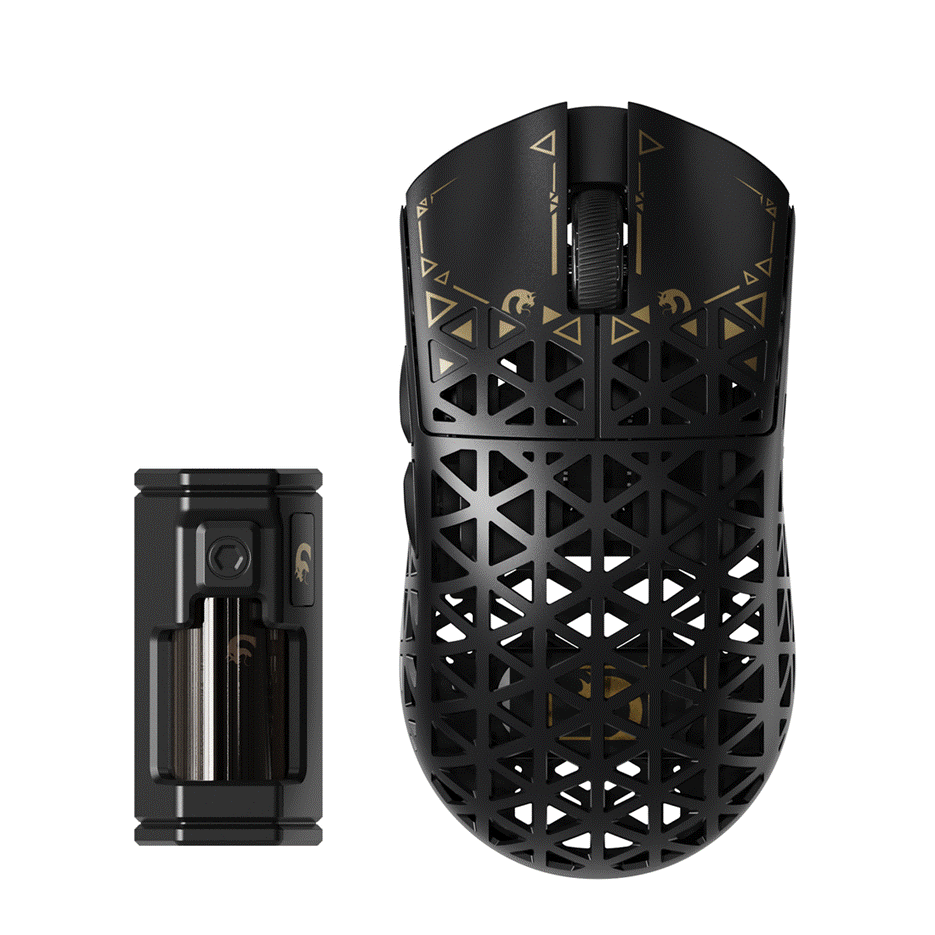
In competitive gaming, the difference between victory and defeat often comes down to milliseconds—a fraction of a second where your equipment either keeps up with your reflexes or holds you back. Every serious gamer knows the frustration: your wrist aches after a three-hour ranked session, your mouse starts double-clicking after months of intense use, or a tangled cable snags at the worst possible moment. These aren't minor inconveniences; they're performance killers that can derail your climb through the ranks. Enter the carbon fiber wireless mouse—a piece of engineering that directly addresses the most persistent pain points gamers face. By combining aerospace-grade carbon fiber construction with cutting-edge wireless technology, this category of mouse delivers what competitive players desperately need: a shell that refuses to break down under punishment, a featherlight body that keeps your wrist healthy through marathon sessions, and cable-free freedom that eliminates desk clutter and movement restrictions. Whether you're a first-person shooter enthusiast demanding pixel-perfect aim or a MOBA player executing rapid ability combos, understanding what this technology offers could fundamentally change how you compete.
Standard gaming mice typically rely on ABS plastic shells—functional, affordable, but ultimately limited in both durability and weight optimization. A carbon fiber wireless mouse represents a fundamentally different approach to peripheral design. It merges a material originally developed for Formula 1 cars and aircraft fuselages with wireless transmission protocols engineered specifically for competitive gaming's unforgiving demands. This convergence matters because today's esports landscape rewards players who eliminate every possible variable working against them. A mouse that's simultaneously stronger and lighter than anything built from conventional materials gives you a tangible mechanical advantage. You move faster with less effort, your equipment survives thousands of hours of aggressive use, and you never lose a crucial fight because a cable caught on your monitor stand. For competitive gamers who invest heavily in high-refresh monitors, mechanical keyboards, and premium headsets, the mouse remains the single most interactive piece of hardware in their arsenal—it translates every micro-adjustment of your hand directly into in-game action. The three pillars that make carbon fiber wireless mice worth serious consideration are structural resilience that outlasts the competition, a weight profile that protects your body during extended play, and wireless performance that finally matches wired reliability. Each of these deserves a closer look.
Gaming mice endure punishment that most peripherals never face. Competitive players execute thousands of clicks per hour, slam their mouse into sudden direction changes during flick shots, and subject their equipment to the accumulated stress of daily multi-hour sessions. Traditional ABS plastic shells develop hairline fractures over time, side grips peel away from repeated lateral pressure, and surface coatings wear through to reveal cheap material underneath. Carbon fiber fundamentally changes this equation. The material's strength-to-weight ratio exceeds steel by a factor of five while remaining dramatically lighter—meaning the shell absorbs impacts, resists flex, and maintains its structural integrity long after a plastic equivalent would have developed creaks or stress marks. Unlike aluminum alternatives that add unnecessary heft and can dent on impact, carbon fiber distributes force across its woven fiber matrix, preventing localized damage from drops or aggressive grip pressure. For gamers who've experienced the frustration of a mouse developing rattle or button wobble after six months of heavy use, carbon fiber construction eliminates the gradual degradation that plagues conventional builds. The surface itself resists the oils and sweat from your hands far better than coated plastics, maintaining its texture and grip characteristics across the mouse's entire lifespan. This isn't about luxury—it's about owning equipment that performs identically on day one thousand as it did on day one.

The carbon fiber shell is only part of the durability story. Premium models pair their advanced chassis with mechanical or optical switches rated for tens of millions of actuations, eliminating the double-click failures that plague cheaper alternatives. Scroll wheel encoders use precision bearings rather than friction-fit plastic, ensuring consistent tactile feedback even after years of scrolling through weapon inventories or adjusting zoom levels. Internal PCB mounting points are reinforced to prevent the micro-flex that causes intermittent sensor disconnects in lower-quality mice. When evaluating options, look for manufacturers who publish specific stress-test data: drop-test certifications, click-cycle ratings, and temperature tolerance ranges all indicate a product designed for longevity rather than planned obsolescence. Products tested against IEC or MIL-STD durability benchmarks provide measurable confidence that your investment survives real-world gaming conditions rather than just controlled laboratory scenarios.
Wrist strain isn't just uncomfortable—it's a progressive condition that worsens with every gaming session where your hand fights against unnecessary resistance. Repetitive strain injuries account for a significant portion of gaming-related health complaints, and the primary culprit is often the mouse itself. Every gram your mouse weighs is a gram your wrist muscles must accelerate, decelerate, and redirect hundreds of times per minute during intense gameplay. Carbon fiber's extraordinary strength-to-weight ratio allows manufacturers to build structurally rigid shells that weigh dramatically less than their plastic counterparts without resorting to fragile honeycomb cutouts that collect dust and compromise surface integrity. The ergonomic principle is straightforward: a lighter mouse requires less force to move, which means your forearm muscles and wrist tendons experience substantially reduced cumulative load over a gaming session. This reduction in micro-effort translates directly into two measurable outcomes. First, your reaction times improve because less inertia means your hand can change direction faster—critical for tracking moving targets or executing snap flicks in shooters. Second, your endurance extends significantly, allowing you to maintain peak accuracy in the fifth hour of a tournament that would normally see your precision deteriorate from fatigue. Players who switch from heavier mice frequently report that their aim feels more responsive and natural within days, as their muscle memory recalibrates to equipment that actually moves with their intentions rather than lagging behind them. The health implications extend beyond comfort into career longevity for serious competitors.

Raw weight matters, but where that weight sits within the mouse chassis determines how natural it feels in your hand. A well-engineered carbon fiber mouse positions its heaviest components—battery, sensor, and PCB—near the center of gravity aligned with your grip's natural pivot point. This balanced distribution prevents the mouse from feeling nose-heavy during lifts or tail-heavy during quick swipes, creating a neutral sensation that disappears into your muscle memory. Different grip styles demand different considerations when evaluating weight. Palm grip users, who rest their entire hand on the mouse, generally tolerate slightly higher weights because the load distributes across more contact surface—mice in the 60-75 gram range work well here. Claw grip players, who arch their fingers and use wrist-driven movements, benefit most from the 55-65 gram range where rapid directional changes feel effortless. Fingertip grip users, relying exclusively on finger dexterity for micro-adjustments, should target the lightest options available, ideally below 60 grams, since every gram is amplified by the reduced leverage of fingertip-only contact. When testing a mouse, pay attention to whether it feels balanced during both horizontal sweeps and vertical lifts—any sensation of the weight shifting or the mouse wanting to rotate indicates poor mass distribution that will compound into fatigue over extended sessions.
The persistent myth that wireless mice introduce unacceptable latency died years ago, yet many competitive players still cling to cables out of outdated caution. Modern 2.4GHz wireless protocols deliver response times at or below one millisecond—functionally indistinguishable from a direct USB connection in blind testing, even among professional esports players. The technology has matured to the point where multiple world championship titles across Counter-Strike, Valorant, and Fortnite have been won on wireless mice, definitively proving that cable-free operation no longer means compromised performance. Beyond raw latency numbers, the practical advantages of wireless freedom reshape how you interact with your desk space. Without a cable generating variable drag depending on its position, every swipe feels identical regardless of direction—there's no resistance spike when the cord catches on your mousepad's edge or pulls against its bungee at full extension. Your movements become purely about your hand's intent translated through a frictionless path to your screen. Most premium wireless gaming mice also include Bluetooth connectivity as a secondary option, allowing instant switching to a laptop or secondary device without occupying an additional USB receiver slot. This dual-mode capability transforms a dedicated gaming peripheral into a versatile daily tool. The clutter-free desk that results from eliminating cable management isn't merely aesthetic; it provides unrestricted mousepad coverage that directly expands your effective aiming range during low-sensitivity gameplay.
Battery anxiety has no place in competitive gaming, and current-generation wireless mice have largely eliminated it as a concern. Expect anywhere from 60 to 100+ hours of continuous use on a single charge from quality carbon fiber wireless models, meaning most players charge their mouse once a week or less even with daily multi-hour sessions. Fast-charging capabilities add meaningful insurance—many models recover 10-15 hours of gameplay from just a 10-minute USB-C charge, enough to power through an entire tournament day from a brief break between matches. Intelligent power management plays a crucial role in maintaining consistent performance without manual intervention. Advanced chipsets dynamically adjust polling rates and sensor activity during periods of inactivity, dropping into low-power states within seconds of releasing the mouse and waking instantly upon contact. This happens transparently, with zero perceptible delay when you grab the mouse again. Some models offer adjustable polling rates that let you choose between maximum responsiveness at higher power draw during competition and reduced rates for casual browsing that extend battery life dramatically. When evaluating options, prioritize mice that maintain their full advertised polling rate and sensor tracking speed regardless of remaining battery percentage—cheaper implementations sometimes throttle performance as charge depletes, introducing inconsistency precisely when you can least afford it during a late-night session.
Knowing the advantages of carbon fiber wireless mice is one thing—selecting the right one for your specific needs requires a more systematic approach. The market offers dozens of options from brands like MAMBASNAKE and others with varying shapes, sensor configurations, and build philosophies, and the wrong choice can leave you with a technically impressive mouse that simply doesn't suit your hand or playstyle. Rather than relying on brand loyalty or flashy marketing, work through these four steps to narrow your options based on measurable criteria that directly impact your daily gaming experience. This process ensures you invest in a mouse that complements your physiology, matches your competitive requirements, and delivers genuine long-term value rather than buyer's remorse after the novelty fades.
Before comparing specifications, measure your hand from the base of your palm to the tip of your middle finger, and across the widest point of your knuckles. These two measurements determine whether you need a small, medium, or large mouse shell. Next, identify your natural grip by paying attention to how you hold your current mouse during intense gameplay—not during casual browsing, where habits differ. Palm grip users need a mouse long enough to support their entire hand with a pronounced rear hump that fills the palm's arch. Claw grip players should look for shorter bodies with a more aggressive rear curve that accommodates arched fingers while still providing palm contact at the base. Fingertip grip users require compact, flat-profile mice that allow unrestricted finger movement without the rear shell contacting their palm. Mismatching your grip style to mouse shape forces your hand into unnatural positions that negate the ergonomic benefits of lightweight carbon fiber construction, so get this foundation right before moving forward.
With your physical requirements defined, evaluate the technical specifications that determine in-game responsiveness. Sensor quality matters most—look for modern optical sensors from established manufacturers that offer flawless tracking without acceleration, smoothing, or angle snapping artifacts. Your DPI range should comfortably encompass your preferred sensitivity with room for adjustment; most competitive players operate between 400 and 1600 DPI, but having a wider range available allows experimentation. Polling rate directly affects how frequently the mouse reports its position to your PC, with 1000Hz being the competitive standard and some newer models offering 2000Hz or 4000Hz for marginally smoother cursor movement on high-refresh displays. Programmable buttons add versatility for genre-specific bindings—MOBA and MMO players may want additional side buttons, while FPS players typically prefer fewer buttons to reduce accidental presses and overall weight. Confirm that the mouse's software allows onboard profile storage so your settings travel with the device regardless of which PC you connect to.
Carbon fiber construction commands a premium over standard plastic mice, so establish which features are non-negotiable versus nice-to-have. Confirm the advertised weight includes the battery—some manufacturers list shell weight alone, which misrepresents the actual in-hand experience. Verify that the carbon fiber is structural rather than cosmetic; some budget options apply a thin carbon fiber veneer over a standard plastic frame, delivering the aesthetic without the durability or weight benefits. Check switch ratings and whether the manufacturer offers warranty coverage that reflects confidence in their build quality. A mouse lasting three to four years of heavy use at a higher upfront cost ultimately costs less per year than replacing cheaper alternatives annually. Allocate your budget toward the features that align with your identified needs from the previous steps rather than paying extra for RGB lighting or accessories that don't improve gameplay.
Specifications tell you what a mouse should do on paper; user reviews and hands-on testing reveal what it actually does in practice. Seek out reviews from players who share your grip style, hand size, and primary game genre—their experience predicts yours far more accurately than a general overview. Pay attention to reports about build quality after several months of use, wireless stability in environments with multiple competing signals, and whether the mouse maintains its advertised weight without feeling flimsy. If local retailers or gaming cafes stock the model you're considering, spend even five minutes holding it to confirm the shape feels natural in your grip. Online communities and forums dedicated to gaming peripherals often maintain spreadsheets comparing real-world weights, click latency measurements, and long-term reliability reports that cut through manufacturer marketing. Trust verified purchaser feedback over sponsored content, and don't hesitate to order from retailers with generous return policies so you can test a mouse in your actual gaming environment before committing.
A carbon fiber wireless mouse isn't just another peripheral upgrade—it's a deliberate investment in your competitive longevity and daily comfort. The durability of carbon fiber ensures your mouse performs consistently for years without developing the rattles, creaks, or structural failures that plague conventional plastic builds. The lightweight construction directly combats the wrist strain and fatigue that accumulate across countless gaming sessions, protecting your health while simultaneously sharpening your reaction speed and aim precision. And modern wireless technology has definitively closed the gap with wired connections, delivering sub-millisecond response times alongside the unrestricted movement freedom that lets you play without physical compromise. Together, these three advantages create a peripheral that actively supports your improvement rather than silently working against it. Take an honest look at your current setup—if your mouse feels heavy after long sessions, if you've noticed wear or inconsistency creeping in, or if a cable has ever disrupted your aim at a critical moment, those are signals that your equipment is limiting your potential. The technology exists to eliminate every one of those barriers. Your reflexes and game sense deserve hardware that keeps pace with your ambition, so make the upgrade that lets your skill, not your equipment, define your ceiling.